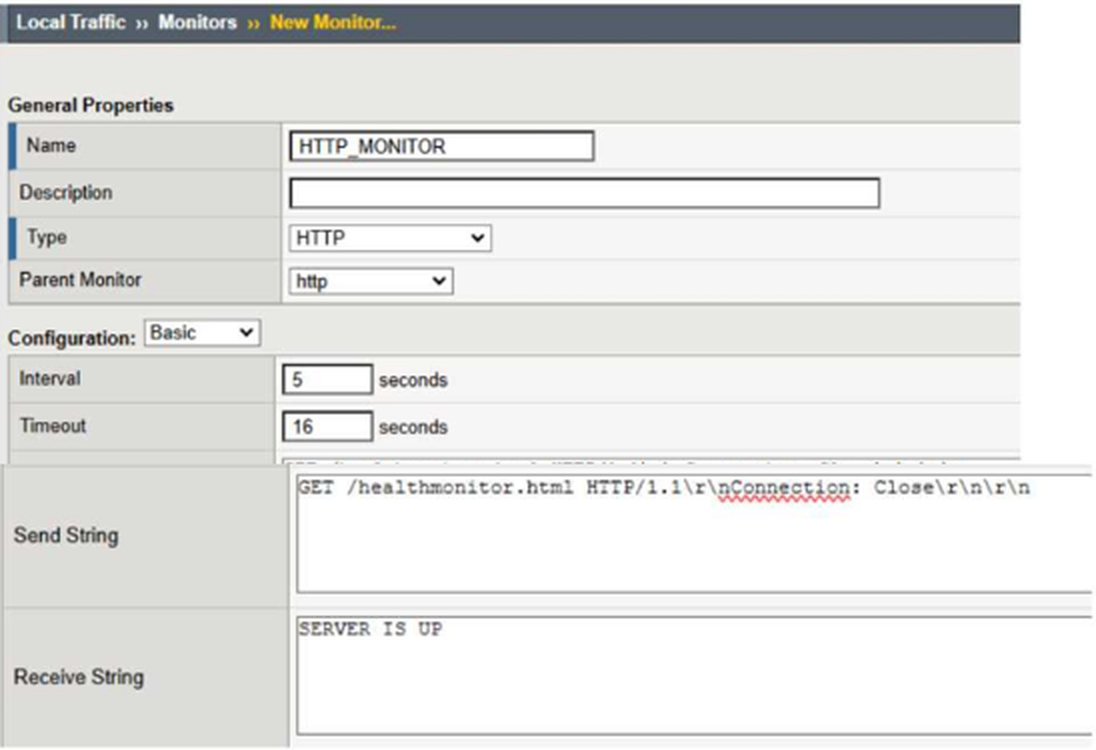
Correct Answer: A
Explanation:
Comprehensive and Detailed Explanation From BIG-IP Administration Data Plane Configuration/Course Guide/topics:
The monitor is explicitly sending an HTTP/1.1 request. For HTTP/1.1, the request must contain a valid Host header identifying the intended virtual host. The configured monitor sends the URI and Connection: Close header but omits Host: www.f5.com. A web server using name-based virtual hosting can therefore reject the request with HTTP 400 Bad Request, which explains why every pool member is marked down.
F5's official BIG-IP monitor documentation gives the HTTP/1.1 convention in the form 'GET / HTTP/1.1\r\nHost: server.com\r\nConnection: close\r\n\r\n'.
Option A follows that required structure: the request line identifies HTTP/1.1, Host: www.f5.com selects the correct hosted site, Connection: Close requests connection termination after the response, and the final \r\n\r\n properly terminates the HTTP header section. F5 also specifies that when HTTP/1.0 or HTTP/1.1 is used, the monitor evaluates the HTTP status code; a non-200 response such as 400 causes the monitored resource to be considered unavailable.
Reference Topics: BIG-IP LTM Monitors Reference HTTP Monitor Send String, HTTP/1.1 request formatting, pool-member health monitoring.